We Rebuilt How You Add a Clip—And It Changes Everything
Reverie redesigned the clip-adding workflow to distinguish between continuity, hard cuts, and character introductions, turning a repetitive action into an intentional creative choice.
The Unsexy Feature That Matters Most
We just shipped something that won't make anyone's highlight reel. It's not a new AI model, it's not a cutting-edge effect, and it won't trend on Twitter. We rebuilt how you add a clip to your project.
But here's the thing: filmmakers aren't adding one clip. They're adding fifty. Or a hundred. Every single one of those additions is a creative decision that deserves to be made intentionally, not mechanically. So we spent this quarter fixing something that most tools treat as a throwaway action.
The Problem With Treating Everything the Same
Until now, "add a clip" was just "add a clip." Generic. Neutral. Invisible.
Except it's not invisible in your head. When you place a shot after another shot, you're making a choice: Does this continue the previous moment? Is this a hard cut to somewhere new? Are you introducing a new character? Each of these is a fundamentally different creative intent.
Your editing tool should understand that difference. It should anticipate what you're trying to do.
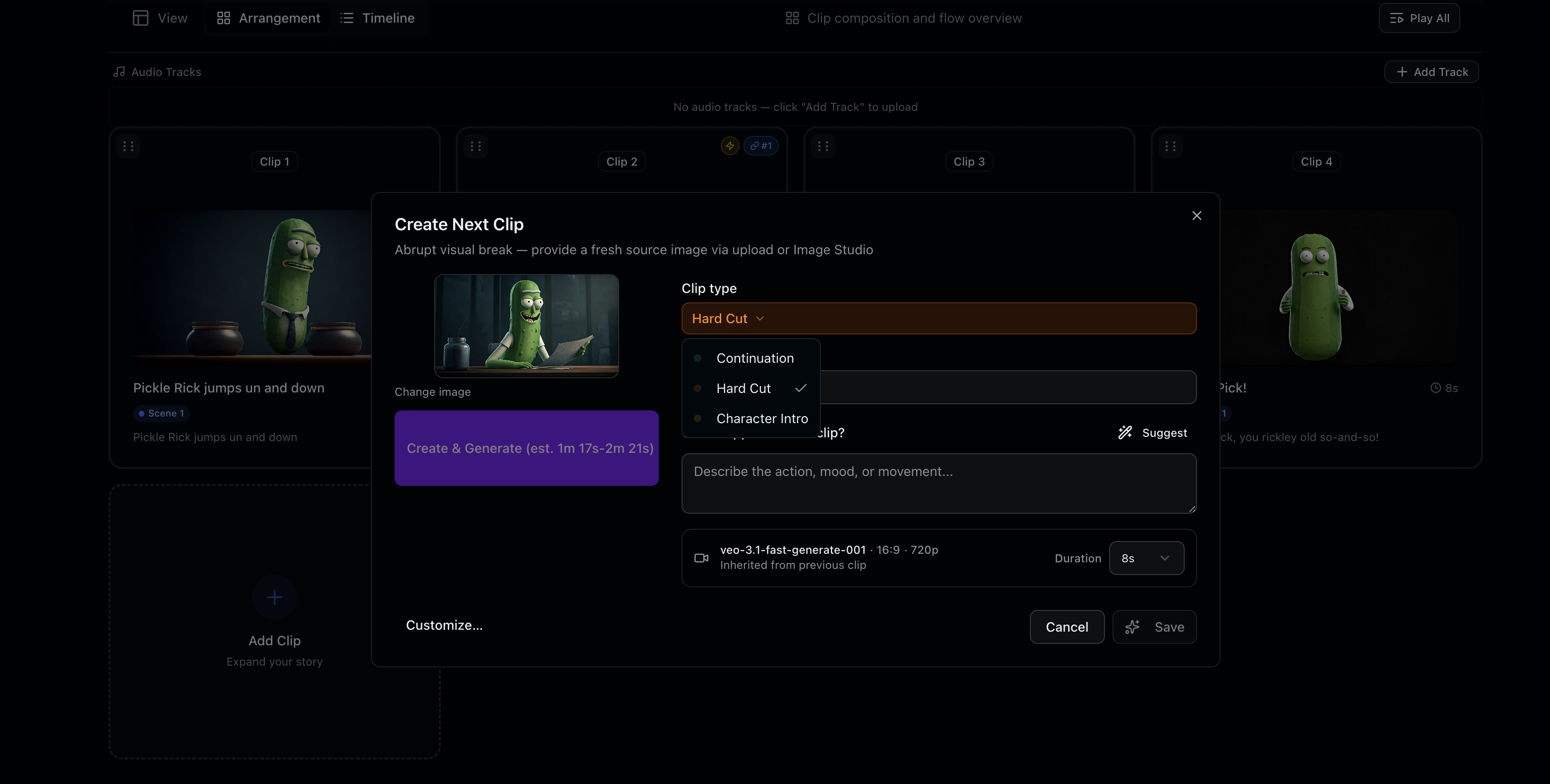
Three Distinct Intentions, Three Distinct Workflows
The new clip-adding experience gives you explicit choices that match your actual creative thinking:
- Continuity clips — seamless extensions of the shot before, maintaining space and momentum
- Hard cut clips — intentional breaks that shift location, subject, or tone
- Character clips — shots introducing or re-establishing a new person in the scene
Each path now guides the tool toward generating or suggesting content that fits that intention. Continuity clips work differently than character intros. The interface reflects that. Your intent gets built into the system from the start.
The Fifty-Time Test
There's a design principle we live by at Reverie: the test for any interaction you repeat fifty times is not whether it works—it's whether it still feels light on the fiftieth go.
A clunky workflow might be tolerable once. After fifty repetitions, it becomes a weight you carry throughout your entire creative process. It taxes your attention. It slows your momentum. It's death by a thousand paper cuts.
So we obsessed over this. We made it faster. We made it clearer. We made it feel like the tool understands your filmmaking brain, not just your mouse clicks.
What's Next
This is just the beginning. The clip workflow unlocks better downstream intelligence—smarter shot suggestions, more contextual generation, tighter integration with your creative vision. But we wanted to ship this foundation first and get it right.
We're building in public because the details matter, and your feedback shapes what comes next.
See It in Action
Ready to feel the difference? Head over to Reverie Movies and start a new project. You'll get 300 free credits to explore the rebuilt workflow and see how intention-driven editing changes your process. This is the kind of feature that's easy to overlook until you use it—then you wonder how you ever worked without it.