Quick Create: From Idea to Clip in Seconds
Reverie's Quick Create eliminates friction between inspiration and execution, letting filmmakers start making immediately.
The fastest way to kill an idea is to make it hard to start.
Every extra step between "I have an idea" and "I am making it" is a place where the idea dies. We've all felt it—that moment when inspiration hits, but the tool demands configuration, setup decisions, model selection, and prompt engineering before you've made a single thing. By the time you're ready to create, the spark is gone.
That's the problem we set out to solve with Quick Create.
The Problem with Setup Friction
Most creative tools front-load complexity. They're powerful, but they're also demanding. Before you can make anything, you have to become an expert in how the tool works.
This is especially true in AI filmmaking, where the gap between casual creator and power user can feel enormous. Model selection, parameter tuning, prompt engineering—these are all valuable skills, but they shouldn't be prerequisites for getting started.
We wanted to build something different.
How Quick Create Works
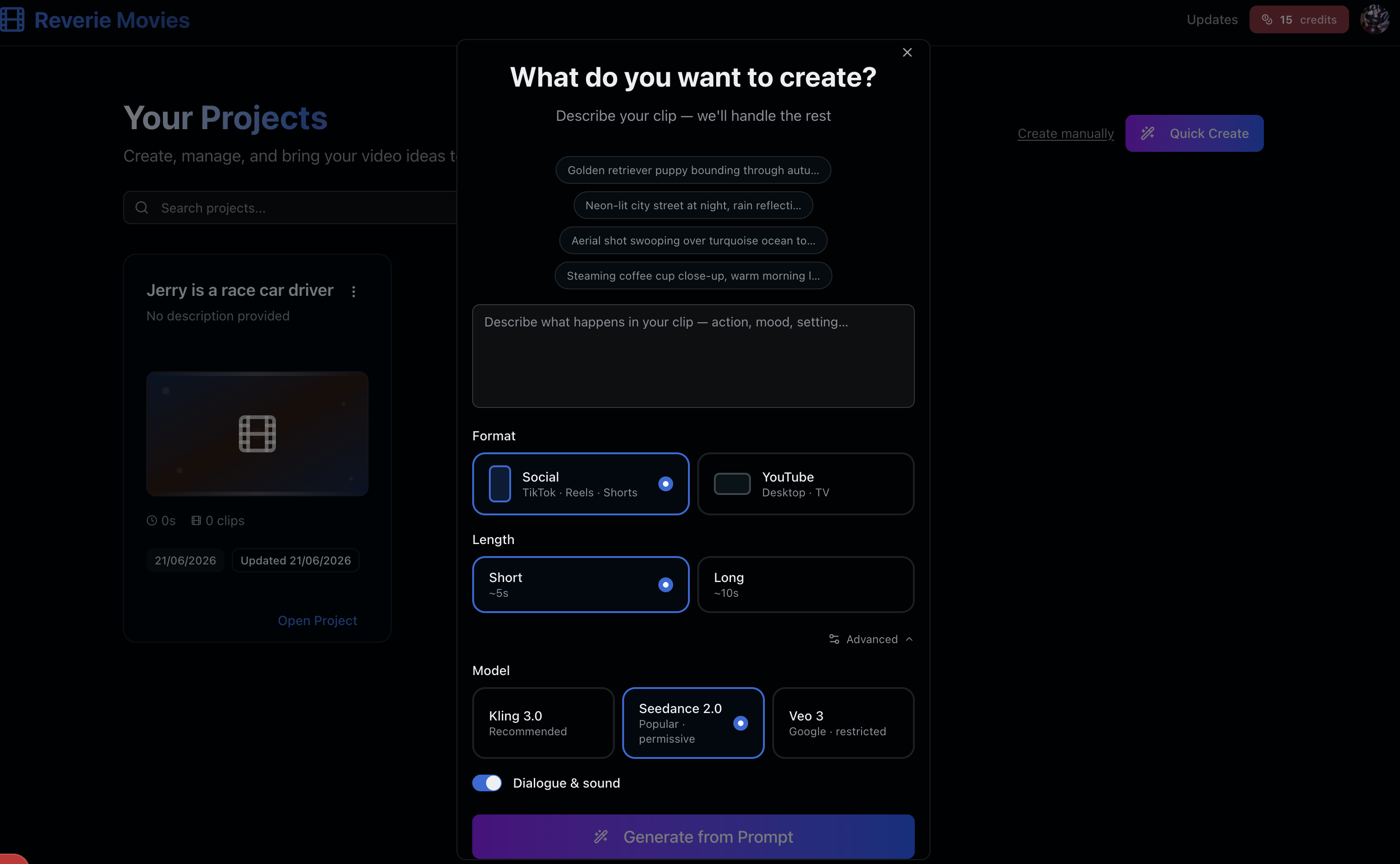
The workflow is intentionally simple:
- Describe your scene — Write or speak what you see. A sentence or two is enough.
- Get a clip — We handle the rest. No model selection, no parameter hunting, no waiting for configuration screens.
- Start from something real — Now that you have material to work with, the real creative work begins. Refine, iterate, build on what you have.
The key insight is this: filmmaking is a craft of iteration. You don't need perfection on the first pass. You need something to react to, to build from, to make decisions about.
Why Speed Matters to Creativity
There's a direct relationship between how fast you can experiment and how much creative exploration you can do in a session. When every iteration takes minutes instead of seconds, you stop taking creative risks.
Quick Create puts the focus back where it belongs: on your vision, not on learning the tool. The goal is not to replace the craft of filmmaking. It's to get you into it faster, so the work can begin before the inspiration fades.
This is especially important for indie filmmakers working with limited time. Every minute spent in configuration is a minute not spent making decisions about your story, your shots, your creative direction.
What's Next
We're building in public, and Quick Create is just the beginning. We're listening to how creators use this feature to understand what friction points remain in the filmmaking workflow.
More updates are coming. Follow along at reveriemovies.com/updates.
Ready to Create?
The best way to understand Quick Create is to use it. Head to Reverie and start making—you'll get 300 free credits to explore. Your next idea doesn't need to wait for setup. It needs to become real, right now.