Timeline View: Finally, AI Video Tools That Actually Sequence Your Story
Reverie's new Timeline view lets you arrange, transition, and play your entire film in one place—no more disconnected clips.
Most AI video tools stop after generation. You get a folder full of clips—great individual shots, sure, but they don't talk to each other. Different lighting. Different character appearances. No narrative flow. You're left stitching together a patchwork instead of a film.
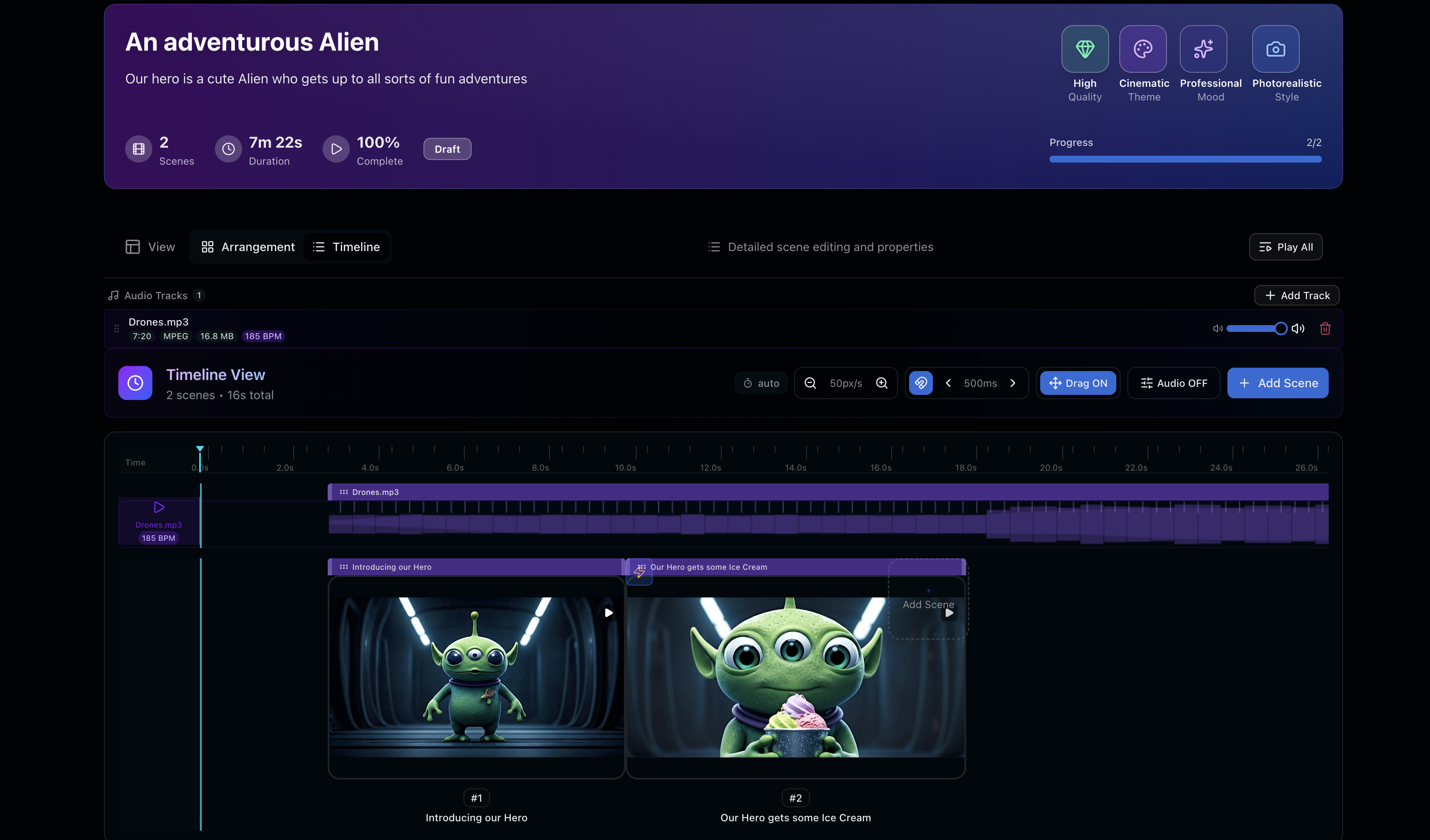
We built Reverie to think differently about this problem. Today, we're shipping Timeline view—a feature that treats your entire story as a single, cohesive production.
The Problem We Solved
AI video generation is powerful. But it's been missing a crucial piece: the assembly layer. You generate Scene A. Then Scene B. Then Scene C. But they exist in isolation.
That's not how filmmaking works. A film is a sequence of moments that build on each other. Lighting carries forward. Characters evolve. Tension builds. None of that happens when your clips live in separate files.
We kept hearing the same frustration from filmmakers: "I have all these great shots. Now what?"
What Timeline View Does
Timeline view brings every scene into a single, editable workspace. Here's what that actually means:
- Arrange in order — Drag scenes into narrative sequence without leaving Reverie
- Set transitions — Control how one scene flows into the next (cuts, fades, dissolves)
- Preview end-to-end — Play your entire film from start to finish on the platform
- Edit in context — See how a scene lands when it's surrounded by the scenes before and after it
- Maintain consistency — Keep track of continuity as you build
This is the difference between having footage and having a film.
Production in One Place
The insight here is simple: filmmaking isn't just about generating good clips. It's about orchestrating them into a story.
When everything lives in one platform, you stop thinking in isolated shots. You start thinking in sequences. You see the rhythm. You feel the pacing. You catch continuity issues before they become problems in post.
You're not bouncing between a generation tool, a video editor, a review app, and three cloud folders. You're building your film in one coherent space.
What's Next
Timeline view is the foundation. We're already thinking about what comes next: audio sync, color grading workflows, export presets for different platforms. We're building toward a complete creative suite—not just a clip generator, but a real production environment.
This is what building in public looks like. We ship features that solve real problems. We listen to filmmakers. We iterate.
Start Building Your Film
If you've been frustrated with AI video tools that generate clips but can't help you build a story, it's time to try Reverie. Head to reveriemovies.com and claim 300 free credits to start arranging your timeline today.